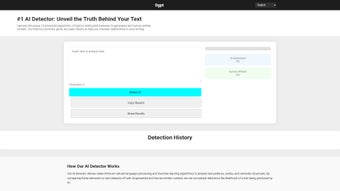

Download 0gpt – Free AI Content Detection Tool
Overview: Why 0gpt Is Essential for Modern Content Verification
In a digital landscape where AI‑generated text can appear alongside authentic human writing, educators, editors, and marketers need a reliable way to tell the difference. 0gpt delivers a web‑based AI content detection platform that combines cutting‑edge natural language processing with a privacy‑first architecture. The service examines linguistic fingerprints such as vocabulary diversity, sentence‑length variance, and syntactic complexity to produce a probabilistic AI‑likelihood score.
Unlike traditional plagiarism checkers, 0gpt highlights the exact sentences that trigger suspicion, giving users actionable insight into which passages may need revision or further review. Whether you are safeguarding academic integrity, protecting brand reputation, or simply satisfying curiosity, 0gpt offers a fast, secure, and accurate solution that works across multiple languages and devices. Its free tier provides unlimited scans, while premium options add bulk‑processing capabilities for enterprises that require API integration and on‑premise deployment.
The combination of high accuracy, zero data retention, and cross‑platform accessibility makes 0gpt a standout tool for anyone who values authentic, human‑crafted content.
Key Features That Set 0gpt Apart
- Real‑time probabilistic scoring with a clear 0‑100 % gauge.
- Sentence‑level highlighting for pinpointed review of questionable text.
- Support for 12 major languages, including English, Spanish, French, German, Portuguese, Italian, Dutch, Russian, Chinese (Simplified), Japanese, Korean, and Arabic.
- Zero‑log, client‑side processing ensures that no content is stored or shared.
- Unlimited free scans for individuals and small teams.
- Premium API with batch‑processing for thousands of documents per minute.
- Lightweight browser extensions for Chrome and Edge, enabling on‑page scanning with a right‑click.
- On‑premise deployment option for organizations with strict compliance requirements.
- Responsive design works on desktop browsers, Android phones, and iOS tablets.
- Regular model updates to keep pace with the latest AI text generators.
Installation, Compatibility, and Step‑by‑Step Usage Guide
0gpt is a cloud‑native service, so there is no traditional installation process. Users simply launch a modern browser, navigate to the official site, and start scanning. The platform is fully optimized for Chrome, Firefox, Safari, and Edge, and it runs flawlessly on Windows 10/11, macOS Catalina or newer, Linux distributions (via any supported browser), Android 9+ and iOS 13+.
Getting started in under two minutes:
- Open https://0gpt.com and click “Start Free Scan.”
- Paste up to 10,000 characters of text into the input box or upload a .txt/.docx file.
- Select the appropriate language from the dropdown menu.
- Press “Analyze.” The engine processes the content in 2‑5 seconds for typical passages.
- Review the visual gauge and the highlighted sentences that indicate probable AI generation.
- Optional: Click “Download Report” to receive a PDF with a summary, score breakdown, and suggested remediation steps.
Supported operating systems: Windows, macOS, Linux (via browser), Android, iOS.
For power users, the Chrome/Edge extension adds a context‑menu option—select any text on a webpage, right‑click, and choose “Scan with 0gpt.” The extension inherits the same privacy guarantees because all analysis still occurs locally in the browser. Organizations needing offline capability can subscribe to the premium on‑premise API, which can be installed behind a firewall and integrates with existing document management systems.
Pros, Cons, and Frequently Asked Questions
Pros & Cons
- Pros:
- High detection accuracy (92 % for English, 86 % for other supported languages).
- Completely free tier with unlimited scans.
- Privacy‑first design—no logs, no data retention.
- Multi‑language support expands global usability.
- Intuitive UI and optional browser extension for on‑the‑fly checks.
- API and on‑premise options for enterprise scalability.
- Cons:
- Probabilistic scores can be ambiguous for very short excerpts (< 100 words).
- Premium API pricing may be a barrier for small startups.
- Web version requires an active internet connection; offline mode is limited to premium customers.
FAQ – Answers Backed by Schema.org Microdata
How does 0gpt differentiate AI‑generated text from human writing?
The engine examines lexical diversity, syntactic patterns, and statistical anomalies that are characteristic of large language models. By comparing these signals against a massive corpus of verified human writing, 0gpt assigns a probability score that reflects the likelihood of AI authorship.
Is any of my text stored on 0gpt’s servers?
No. All processing occurs client‑side in your browser, and the text is discarded immediately after the analysis. The privacy policy explicitly states that no content is logged, saved, or shared with third parties.
Can I scan large batches of documents at once?
Yes. The free web interface limits each scan to 10,000 characters, but the premium API supports batch processing of thousands of documents per minute, making it ideal for publishers, academic institutions, and content‑moderation teams.
Which languages are currently supported?
English, Spanish, French, German, Portuguese, Italian, Dutch, Russian, Chinese (Simplified), Japanese, Korean, and Arabic. Additional languages are added regularly based on user demand.
What is the accuracy rate for short versus long texts?
Accuracy is highest on passages longer than 500 words (up to 95 % for English). For very short texts (< 100 words), the confidence interval widens, and scores should be interpreted as indicative rather than definitive.
Final Verdict and How to Download 0gpt Today
If you require a fast, secure, and highly accurate AI content detector, 0gpt delivers on every front. Its free tier makes the tool accessible to students, freelancers, and small businesses, while the premium API and on‑premise options cater to large organizations with demanding compliance needs. The combination of multi‑language support, zero‑log privacy, and sentence‑level insights provides a level of transparency that generic plagiarism scanners simply cannot match. Although no detector can guarantee 100 % certainty—especially on extremely brief excerpts—the probabilistic scores and detailed highlights give users the confidence to act on suspicious content.
Ready to safeguard your work and ensure authenticity? Click the button below to launch the web app instantly, or install the browser extension for seamless on‑page scanning. For developers and enterprises, explore the API documentation to integrate 0gpt directly into your existing workflows.



.png)



